

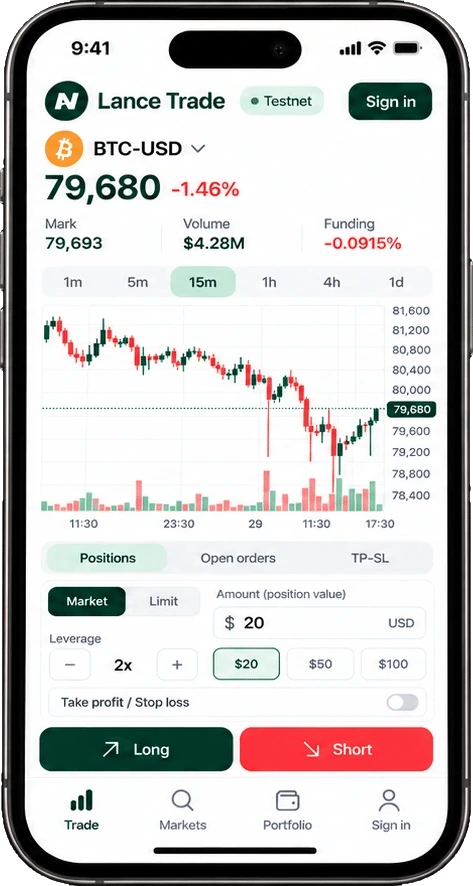
Example screen of Lance Trade on a phone.
The screen
- Markets: search crypto perps, see live prices and keep favourites.
- Chart: live candles for the market you picked. Your open orders show as dashed lines.
- Order book and trades: live from Hyperliquid. Click a price in the book to use it for a limit order.
- Order panel: side, market or limit, amount, leverage, and take profit and stop loss.
- Positions, open orders, trade history, funding and account history, under the chart.
Market orders
Pick Long or Short, an amount and a leverage. You can add a take profit and stop loss in the panel; the bot places them from the fill price. Check the summary, then confirm.Limit orders
Switch the panel to Limit and set a price. Mid fills in the current mid price. Then pick how long the order lives:
Some limits apply to limit orders:
- The price must be within 50% of the current mid.
- A limit order can’t be priced further through the book than your community’s price limit. It would fill straight away, like a market order.
- You can’t attach a take profit or stop loss to a limit order. Set them from Positions once it fills.
Open orders
Resting orders show under Open orders, with a Cancel button each, and as dashed lines on the chart. When one fills later, it shows in Trade history and Lance Trade raises a notice.One leverage per market
Hyperliquid keeps one leverage per market. With a position or resting orders in a market, a new order there must use the same leverage. The panel starts at that leverage when it can. Otherwise it explains why before you send, and offers a Use Nx button where that fixes it.The same rules as your bot
Your community’s markets, leverage cap and order sizes apply in Lance Trade too, as do the order book checks. Defaults such as order size and leverage are shared with the bot’s Settings. If your community owner pauses trading, you can still cancel open orders, take profits and stop losses in Lance Trade. Everything else waits until trading resumes. You can always manage your positions directly on Hyperliquid with your wallet.Risk warning. Trading perpetual futures with leverage is high risk. Prices can move fast and you can lose all the money you put in. Lance is software: it does not give investment advice, manage money or trade on anyone’s behalf. Trades are executed on Hyperliquid, a third-party exchange that is not affiliated with Lance. Lance is not available to persons in the United States, the United Kingdom and sanctioned countries. Nothing on this site is an offer or solicitation where it would be unlawful. Full risk disclosure